Non-unique indexes that COULD be unique

In my last post I showed a query to identify non-unique indexes that should be unique.

You maybe have some other indexes that could be unique based on the data they contain, but are not.

To find out, you just need to query each of those indexes and group by the whole key, filtering out those that have duplicate values. It may look like an overwhelming amount of work, but the good news is I have a script for that:

[Read More]

Non-unique indexes that should be unique

Defining the appropriate primary key and unique constraints is fundamental for a good database design.

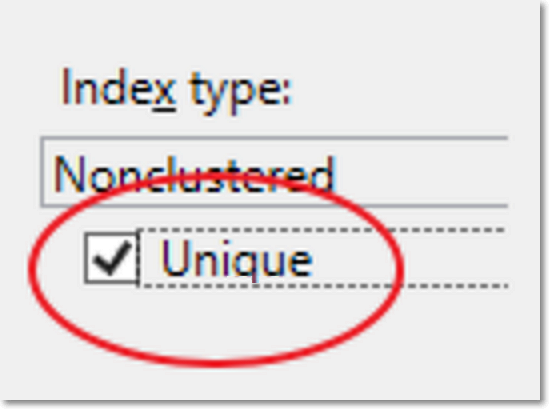
unique

One thing that I often see overlooked is that all the indexes with a key that includes completely another UNIQUE index’s key should in turn be created as UNIQUE. You could argue that such an index has probably been created by mistake, but it’s not always the case.

If you want to check your database for indexes that can be safely made UNIQUE, you can use the following script:

[Read More]

SQL Server Agent in Express Edition

As you probably know, SQL Server Express doesn’t ship with SQL Server Agent.

This is a known limitation and many people offered alternative solutions to schedule jobs, including windows scheduler, free and commercial third-party applications.

My favourite SQL Server Agent replacement to date is Denny Cherry’s Standalone SQL Agent, for two reasons:

  1. It uses msdb tables to read job information. This means that jobs, schedules and the like can be scripted using the same script you would use in the other editions.
  2. It's open source and it was started by a person I highly respect.
However, while I still find it a great piece of software, there are a couple of downsides to take into account:
  1. It's still a beta version and the project hasn't been very active lately.
  2. There's no GUI tool to edit jobs or monitor job progress.
  3. It fails to install when UAC is turned on
  4. It's not 100% compatible with SQL Server 2012
  5. It doesn't restart automatically when the SQL Server instance starts
  6. It requires sysadmin privileges
The UAC problem during installation is easy to solve: open an elevated command prompt and run the installer msi. Easy peasy.

As far as SQL Server 2012 is concerned, the service fails to start when connected to a 2012 instance. In the ERRORLOG file (the one you find in the Standalone SQL Agent directory, not SQL Server’s) you’ll quickly find the reason of the failure: it can’t create the stored procedure sp_help_job_SSA. I don’t know why this happens: I copied the definition of the stored procedure from a 2008 instance and it worked fine.

[Read More]

COPY_ONLY backups and Log Shipping

Last week I was in the process of migrating a couple of SQL Server instances from 2008 R2 to 2012.

In order to let the migration complete quickly, I set up log shipping from the old instance to the new instance. Obviously, the existing backup jobs had to be disabled, otherwise they would have broken the log chain.

That got me thinking: was there a way to keep both “regular” transaction log backups (taken by the backup tool) and the transaction log backups taken by log shipping?

[Read More]

Open SSMS Query Results in Excel with a Single Click

The problem

One of the tasks that I often have to complete is manipulate some data in Excel, starting from the query results in SSMS.

Excel is a very convenient tool for one-off reports, quick data manipulation, simple charts.

Unfortunately, SSMS doesn’t ship with a tool to export grid results to Excel quickly.

Excel offers some ways to import data from SQL queries, but none of those offers the rich query tools available in SSMS. A representative example is Microsoft Query: how am I supposed to edit a query in a text editor like this?

[Read More]

Copy user databases to a different server with PowerShell

Sometimes you have to copy all user databases from a source server to a destination server.

Copying from development to test could be one reason, but I’m sure there are others.

Since the question came up on the forums at SQLServerCentral, I decided to modify a script I published some months ago to accomplish this task.

Here is the code:

## =============================================
## Author:      Gianluca Sartori - @spaghettidba
## Create date: 2013-10-07
## Description: Copy user databases to a destination
##              server
## =============================================
cls
sl "c:\"
$ErrorActionPreference = "Stop"

# Input your parameters here
$source = "SourceServer\Instance"
$sourceServerUNC = "SourceServer"
$destination = "DestServer\Instance"

# Shared folder on the destination server
# For instance "\\DestServer\D$"
$sharedFolder = "\\DestServer\sharedfolder"
# Path to the shared folder on the destination server
# For instance "D:"
$remoteSharedFolder = "PathOfSharedFolderOnDestServer"

$ts = Get-Date -Format yyyyMMdd

#
# Read default backup path of the source from the registry
#

$SQL_BackupDirectory = @"
    EXEC master.dbo.xp_instance_regread
        N'HKEY_LOCAL_MACHINE',
        N'Software\Microsoft\MSSQLServer\MSSQLServer',
        N'BackupDirectory'
"@

$info = Invoke-sqlcmd -Query $SQL_BackupDirectory -ServerInstance $source

$BackupDirectory = $info.Data

#
# Read master database files location
#
$SQL_Defaultpaths = "
    SELECT *
    FROM (
        SELECT type_desc,
            SUBSTRING(physical_name,1,LEN(physical_name) - CHARINDEX('\', REVERSE(physical_name)) + 1) AS physical_name
        FROM master.sys.database_files
    ) AS src
    PIVOT( MIN(physical_name) FOR type_desc IN ([ROWS],[LOG])) AS pvt
"

$info = Invoke-sqlcmd -Query $SQL_Defaultpaths -ServerInstance $destination

$DefaultData = $info.ROWS
$DefaultLog = $info.LOG

#
# Process all user databases
#
$SQL_FullRecoveryDatabases = @"
    SELECT name
    FROM master.sys.databases
    WHERE name NOT IN ('master', 'model', 'tempdb', 'msdb', 'distribution')
"@

$info = Invoke-sqlcmd -Query $SQL_FullRecoveryDatabases -ServerInstance $source

$info | ForEach-Object {

    try {

        $DatabaseName = $_.Name

        Write-Output "Processing database $DatabaseName"

        $BackupFile = $DatabaseName + "_" + $ts + ".bak"
        $BackupPath = $BackupDirectory + "\" + $BackupFile
        $RemoteBackupPath = $remoteSharedFolder + "\" + $BackupFile

        $SQL_BackupDatabase = "BACKUP DATABASE $DatabaseName TO DISK='$BackupPath' WITH INIT, COPY_ONLY, COMPRESSION;"

        #
        # Backup database to local path
        #
        Invoke-Sqlcmd -Query $SQL_BackupDatabase -ServerInstance $source -QueryTimeout 65535

        Write-Output "Database backed up to $BackupPath"

        $BackupPath = $BackupPath

        $BackupFile = [System.IO.Path]::GetFileName($BackupPath)

        $SQL_RestoreDatabase = "
            RESTORE DATABASE $DatabaseName
            FROM DISK='$RemoteBackupPath'
            WITH RECOVERY, REPLACE,
        "

        $SQL_RestoreFilelistOnly = "
            RESTORE FILELISTONLY
            FROM DISK='$RemoteBackupPath';
        "

        #
        # Move the backup to the destination
        #

        $remotesourcefile = $BackupPath.Substring(1, 2)
        $remotesourcefile = $BackupPath.Replace($remotesourcefile, $remotesourcefile.replace(":","$"))
        $remotesourcefile = "\\" + $sourceServerUNC + "\" + $remotesourcefile

        Write-Output "Moving $remotesourcefile to $sharedFolder"
        Move-Item $remotesourcefile $sharedFolder -Force

        #
        # Restore the backup on the destination
        #
        $i = 0
        Invoke-Sqlcmd -Query $SQL_RestoreFilelistOnly -ServerInstance $destination -QueryTimeout 65535 | ForEach-Object {
            $currentRow = $_
            $physicalName = [System.IO.Path]::GetFileName($CurrentRow.PhysicalName)
            if($CurrentRow.Type -eq "D") {
                $newName = $DefaultData + $physicalName
            }
            else {
                $newName = $DefaultLog + $physicalName
            }
            if($i -gt 0) {$SQL_RestoreDatabase += ","}
            $SQL_RestoreDatabase += " MOVE '$($CurrentRow.LogicalName)' TO '$NewName'"
            $i += 1
        }

        Write-Output "invoking restore command: $SQL_RestoreDatabase"
        Invoke-Sqlcmd -Query $SQL_RestoreDatabase -ServerInstance $destination -QueryTimeout 65535
        Write-Output "Restored database from $RemoteBackupPath"

        #
        # Delete the backup file
        #
        Write-Output "Deleting $($sharedFolder + "\" + $BackupFile) "
        Remove-Item $($sharedFolder + "\" + $BackupFile) -ErrorAction SilentlyContinue

    }
    catch {
       Write-Error $_
    }

}

It’s a quick’n’dirty script, I’m sure there might be something to fix here and there.  Just drop a comment if you find something.
Ten features you had in Profiler that are missing in Extended Events

Oooooops!

F1CRASH

I exchanged some emails about my post with Jonathan Kehayias and looks like I was wrong on many of the points I made.

I don’t want to keep misleading information around and I definitely need to fix my wrong assumptions.

Unfortunately, I don’t have the time to correct it immediately and I’m afraid it will have to remain like this for a while.

Sorry for the inconvenience, I promise I will try to fix it in the next few days.

[Read More]

Error upgrading MDW from 2008R2 to 2012

Some months ago I posted a method to overcome some quirks in the MDW database in a clustered environment.

Today I tried to upgrade that clustered instance (in a test environment, fortunately) and I got some really annoying errors.

Actually, I got what I deserved for messing with the system databases and I wouldn’t even dare posting my experience if  it wasn’t cause by something I suggested on this blog.

However, every cloud has a silver lining: many things can go wrong when upgrading a cluster and the resolution I will describe here can fit many failed upgrade situations.

[Read More]

SQL Server services are gone after upgrading to Windows 8.1

Yesterday I upgraded my laptop to Windows 8.1 and everything seemed to have gone smoothly.

I really like the improvements in Windows 8.1 and I think they’re worth the hassle of an upgrade if you’re still on Windows 8.

As I was saying, everything seemed to upgrade smoothly. Unfortunately, today I found out that SQL Server services were gone.

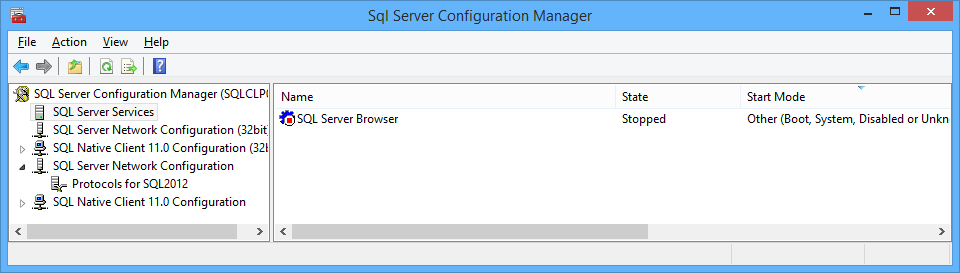
My configuration manager looked like this:

ConfigMan1

My laptop had an instance of SQL Server 2012 SP1 Developer Edition and the windows upgrade process had deleted all SQL Server services but SQL Server Browser.

[Read More]

Check SQL Server logins with weak password

SQL Server logins can implement the same password policies found in Active Directory to make sure that strong passwords are being used.

Unfortunately, especially for servers upgraded from previous versions, the password policies are often disabled and some logins have very weak passwords.

In particular, some logins could have the password set as equal to the login name, which would by one of the first things I would try to hack a server.

[Read More]