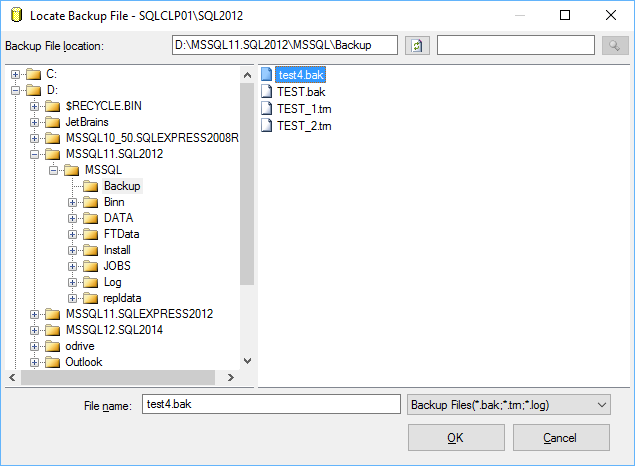
An annoying Bug in the Restore Dialog

Today, thanks to a customer, I discovered  one of those annoying little things that can really drive you nuts.

Basically, they were trying to restore a backup using the SSMS Restore Database window and they kept getting “No backupset selected to be restored” whenever a backup file was selected.

You just had to select a file for restore and click OK…

chooseFile

… to be met with an error message in the Restore Database window:

[Read More]

Blame it on Connect

Connect-logo-NewSome weeks ago I blogged about the discouraging signals coming from Connect and my post started a discussion that didn’t go very far. Instead it died quite soon: somebody commented the post and ranted about his Connect experience. I’m blogging again about Connect, but I don’t want to start a personal war against Microsoft: today I want to look at what happened from a new perspective.

What I find disappointing is a different aspect of the reactions from the SQL Server community, which made me think that maybe it’s not only Connect’s fault.

[Read More]

The big disconnect with Connect

Connect-logo-NewA couple of years ago I blogged about a bug on the Data Collector that I couldn’t resolve but with an ugly workaround. At the end of that post, I stated that I wouldn’t have bothered filing the bug on Connect, due to prior discouraging results. Well, despite what I wrote there, I took the time to open a bug on Connect (the item can be found here), which was promptly closed as “won’t fix”.

[Read More]

Do you need sysadmin rights to backup a database?

backupLooks like a silly question, doesn’t it? - Well, you would be surprised to know it’s not.

Obviously, you don’t need to be a sysadmin to simply issue a BACKUP statement. If you look up the BACKUP statement on BOL you’ll see in the “Security” section that

BACKUP DATABASE and BACKUP LOG permissions default to members of the sysadmin fixed server role and the db_owner and db_backupoperator fixed database roles.
But there's more to it than just permissions on the database itself: in order to complete successfully, the backup device must be accessible:
[...] SQL Server must be able to read and write to the device; the account under which the SQL Server service runs must have write permissions. [...]
While this statement sound sensible or even obvious when talking about file system devices, with other types of device it's less obvious what "permissions" means. With other types of device I mean tapes and Virtual Backup Devices. Since probably nobody uses tapes directly anymore, basically I'm referring to Virtual Backup Devices.

VDI (Virtual Backup device Interface) is the standard API intended for use by third-party backup software vendors to perform backup operations. Basically, it allows an application to act as a storage device.

[Read More]